Small business expense reports that stay simple and controllable.
Rouliva Team gives each person clear entry screens and administrators a short workflow: draft, submitted, approved and paid.
Rules understood before submission
Set allowed categories, limits, receipt thresholds and VAT rules. Important exceptions appear before the expense report is sent.
Send to the correct approver
An administrator chooses a company-wide or member-specific recipient. Users cannot redirect approval when submitting.
Shared history with separate roles
Approvers see expense reports assigned to them, while administrators consolidate months and record payment dates.
Example: three field technicians
Each technician ends September with journeys, meals and job purchases.
- The assistant finds one required receipt missing.
- After correction, expense reports go to the assigned approver.
- Approval is recorded and the administrator later marks them paid.
Every decision remains visible without turning Rouliva into complex accounting software.
A clear decision before reimbursement.
In this small team, Camille prepares an expense report. The manager checks trips, evidence and submitted amounts before approving.
96 business kilometres · €48 to reimburse in this example · €59.88 paid by the company
- The employee prepares and submits the report.
- The manager reviews the file and any exceptions to an enabled expense policy.
- The decision stays in the history. Reimbursement is tracked; Rouliva does not initiate a bank transfer.
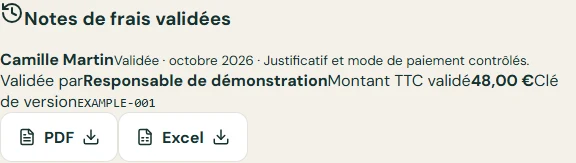
Euro example using a fictional internal rate of €0.50/km; this is not a statutory rate.
View the expense report PDF