Clean, structured data your accountant can use straight away.
Rouliva emails the accounting firm a PDF with receipts and a .txt accounting file matching the same expense report. Clients finally provide clean data instead of photos and spreadsheets that need reworking.
Choose the useful level of detail
PDF supports review, Excel enables line-level checks, and accounting export prepares balanced entries using configured accounts.
Keep payment methods separate
Personally paid expenses feed reimbursement accounts while company card expenses use the configured bank account.
Prepare common imports
The .txt file uses an FEC-equivalent import structure for Pennylane, Sage, Cegid and ISACOMPTA. It is an accounting entry export, not the company’s statutory annual FEC.
Example: September accounting pack
A small business closes 42 journeys, 18 personal expenses and six company card purchases.
- The administrator selects September and the relevant team members.
- Rouliva creates PDF, Excel, entries and supporting files.
- Personal and company-paid amounts stay separate.
The accounting firm finally receives clean, structured and reviewable data instead of rebuilding totals from receipt images.
An authorized file, ready to review.
The company authorizes its accounting firm in Rouliva. The accountant sees approved reports and separates reimbursements from costs already paid by the company.
96 business kilometres · €48 to reimburse in this example · €59.88 paid by the company
- The administrator confirms the link to the correct firm.
- The firm selects the company, year and month to review in read-only access.
- It reviews the PDF, receipts and available exports. The company can revoke access.
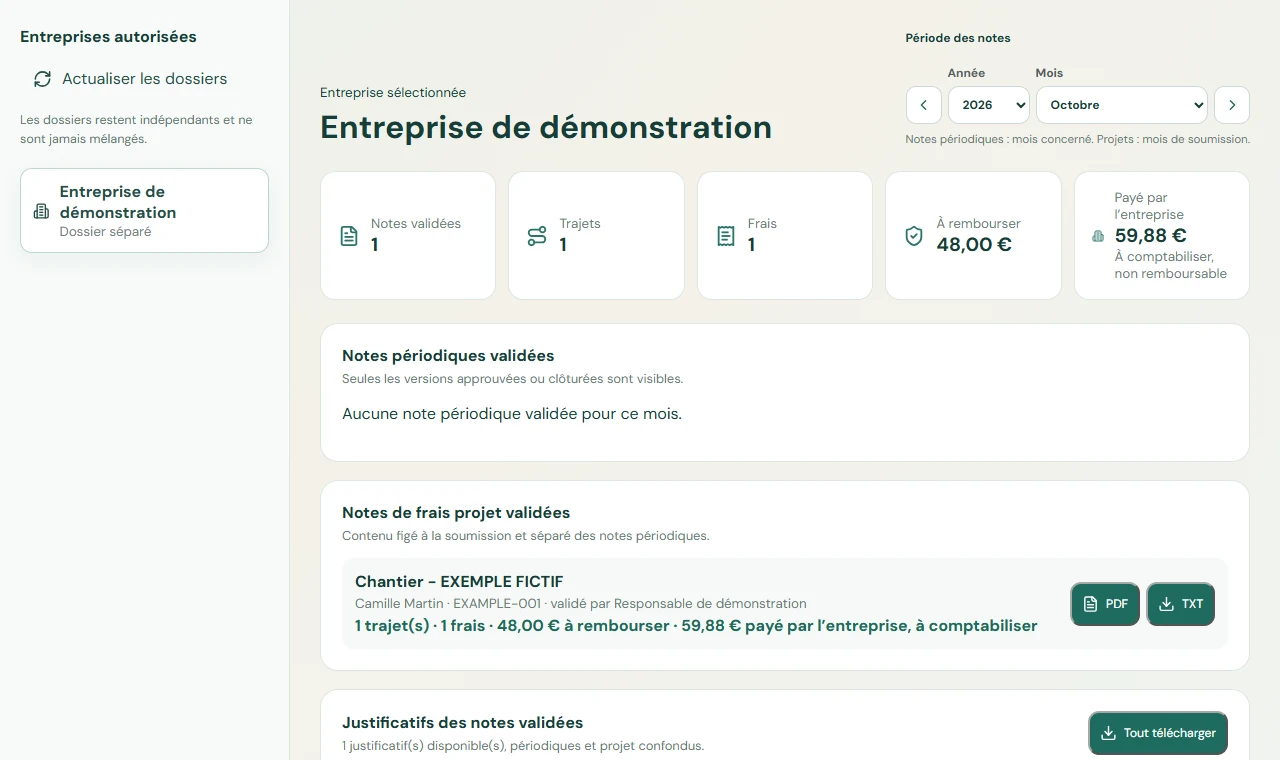
Euro example using a fictional internal rate of €0.50/km; this is not a statutory rate.
View the expense report PDF